


Take It Up: A Reflex Jumping Challenge
Reviews
Take It Up offers a straightforward and engaging reflex jumping experience. The controls are simple, but the increasing speed and complexity of obstacles keep the challenge fresh. The ability to customize your ball character adds a nice personal touch. It is free, runs in the browser, and is perfect for short bursts of play. The score comparison feature also adds a competitive element.
About This Game
Game Introduction
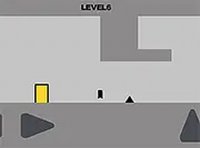
Take It Up is a free online reflex jumping game that challenges players to guide a ball character through a series of obstacles. The core objective is to tap or click at the right moment to make the ball jump over obstacles, advancing as far as possible. The game becomes progressively more difficult, with obstacles appearing faster and in more complex patterns. This increasing challenge keeps the gameplay engaging and encourages players to improve their reflexes and timing. A unique aspect of Take It Up is the in-game store, where players can purchase new ball characters to customize their experience. This feature adds a layer of personalization and motivation. The game is designed to run directly in a web browser, making it easily accessible without any downloads or installations. It is free to play, allowing anyone to jump in and start playing immediately. The simple yet addictive gameplay, combined with the customization options, makes Take It Up a fun choice for players looking for a quick and rewarding challenge.
How to Play
To play Take It Up, players typically tap on the screen or click with a mouse to make the ball jump. The timing of each jump is crucial, as the ball must clear obstacles that appear along its path. The game is optimized for desktop play, so using a keyboard or mouse provides the best control. Players can also switch to full screen mode for a more immersive experience. As the player progresses, their score increases, and they can compare their performance with others. If they wish to change the appearance of their ball, they can visit the in-game store to purchase new characters. Consistent practice helps players improve their skills and achieve higher scores.
Game Features
Take It Up includes fun jumping gameplay that focuses on obstacle avoidance. The game offers character customization through an in-game store where players can buy new ball characters. It also features score competition, allowing players to compare their progress with others. The game is free to play and runs directly in a browser, requiring no downloads. It may include a full screen mode for a more engaging experience. These features combine to create a straightforward yet enjoyable gaming experience.
Tips for Success
Focus on timing your jumps precisely to clear obstacles. Practice regularly to improve your reflexes and learn the rhythm of the game. Try different ball characters from the store to find one that feels comfortable. Pay attention to patterns in obstacle placement as the game speeds up. Stay calm and avoid rushing your taps, as patience often leads to better scores. Compare your performance with others to motivate yourself to improve.






Comments
0 comments